

Overview
81% of people use Instagram to help research products and services, and 2 in 3 people say the network helps foster interactions with brands while forging a strong sense of brand loyalty. This can be a huge support to local businesses. However, recently several users of the platform have expressed a frustration with not being able to find businesses they’re already following or being unable to keep up with the recent activity of those businesses, because their posts are buried among all the others or their stories are pushed back to the end of a long line that users don’t want to scroll all the way through. The average user follows around 822 accounts. (Imagine scrolling through a single line of 822 different accounts’ stories. It can be frustrating and time consuming.)
Goal
In keeping with their mission to help users share moments Instagram would like to find a way to give users more control, so they are able to find these businesses more easily and can continue to support them. One solution they are looking into is creating a feature on a user’s profile page where that particular user is able to create custom “groups” or “boards” that they can attach accounts to. They need this feature to be easy to access for the user, so they are saving them time in their search, not adding to it. Some questions I wanted to answer through research were:
-
How do other social platforms design for grouping followed accounts?
-
Can some of Instagram’s current similar features help influence the design of this new feature? (Bookmarked Posts, Highlights)
-
[Bonus] Would a filter capability be beneficial if added to the main feed that allows users to filter by established “groups”? Would filters work for this particular situation?
(This was a DesignLab UX Academy course project, not a feature project for Instagram. The final results of this project were never utilized by Instagram.)
Role
-
UX and UI Design
Duration
-
4 Weeks
Programs Used
-
Figma
-
InDesign
-
Illustrator
-
Maze.co
Research
For this project I started out by doing research three ways: user interviews, user surveys, and competitor analysis. The types of questions asked in the interviews and surveys involved: how frequently do people use Instagram, how many accounts do they follow, what types of accounts do they follow, what frustrations do they have, and what would they like to see within Instagram. These questions were asked before informing participants of the solution I was hoping to create to confirm that it would be a problem worth solving. Competitor analysis helped inform me on how other sites were using design patterns in a way to solve similar or semi-related problems. The competitors I looked at were: Pinterest, Twitter, and Houzz. Along with looking at these other applications I also looked through Instagram to find similar grouping features within Instagram itself. These features ending up being Story Highlights, Bookmarks and Collections.
Research Methods Utilized
-
1:1 User Interviews
-
User Surveys
-
Competitive Research
Deliverables
Pain Points/Frustrations
My research showed that the biggest pain point with Instagram users today seems to be caused by a) the algorithm Instagram uses to sort users' main feed and b) Instagram’s ever growing addition of shopping and ad posts. Users follow hundreds, sometimes thousands, of accounts on this platform, which means they’re not always able to see all the content the accounts they follow provide. With Instagram posting more ads and their algorithm, which moves posts with the most interaction to the top of the feed, many accounts get lost and forgotten, especially personal and small business accounts. On top of that, when users search for an account they need to know exact words from that account's handle, so if they haven’t seen accounts post in a long time and users don’t remember that handle, but they want to view their account, it’s frustrating hard work.
Also, people continue to use Instagram for the “social” aspect of interacting with friends and family. However, it has become more and more popular for people to use the platform to interact with businesses, artists, and influencers to keep their creative juices flowing (similar to Pinterest) and stay engaged with what’s going on in the world (similar to Twitter). The majority of people are interacting with the app multiple times per day, but yet they still can’t seem to connect with the accounts they most want to. This verified that a feature that allows people to access/view their favorite followed accounts faster in a more organized manner is a feature worth creating.

(Figure 1. Instagram Saved/Bookmarked Posts)
The Fix
The Collections feature within Instagram’s Bookmark feature (Figure 1) is already working to fix this problem, but it focuses on posts rather than accounts - the part that people care about most. Therefore I felt the new feature should be called Account Collections. If users can’t view an account than how can they even view their posts? People like the private aspect of the Bookmark feature and stated this new feature needed to act this way as well. This new feature needed to be separate from the Bookmarks feature though, so accounts and posts don't get confused.
As for the [bonus feature] filter option it sounds like something people may be interested in. Ultimately they were unsure. One way of making this filter ability possible would be to allow accounts to choose tags - such as “business”, “fitness”, “persona”, “dog”, etc. However, people seemed unsure of this idea, as they felt others could mis-tag themselves. Working on creating groups that can be accessed quickly and easily first may solve the problem and make filtering unnecessary.
THE ORGANIZED INSTAGRAM USER
Based on the information I gathered from my surveys and interviews I was able to create a persona (Figure 2) for the most common type of Instagram user I was working to help. This persona helped keep me grounded throughout the project on what was actually needed to help solve this user’s frustrations.
Meet Jessica Strand:
Jessica is an up-and-coming interior designer in the Lincoln, Nebraska area. She loves keeping up with new businesses in the area for both personal and work reasons. She’s a very outgoing and extroverted person, so she makes friends and connections easily. This has led to her following 1000+ accounts and having almost 1000 followers. A large portion of her Instagram use is focused on following competitors and creative accounts for design inspiration. However, in her personal life, she also loves using Instagram to keep up with downtown coffee shops, cute boutiques, and cool restaurants, so she knows the best spots to meet up with friends and support the community. As someone who’s always out and about at either work sites or with friends, her phone is one of her most used tools, which is why she interacts with Instagram on the phone app more so than on her desktop.
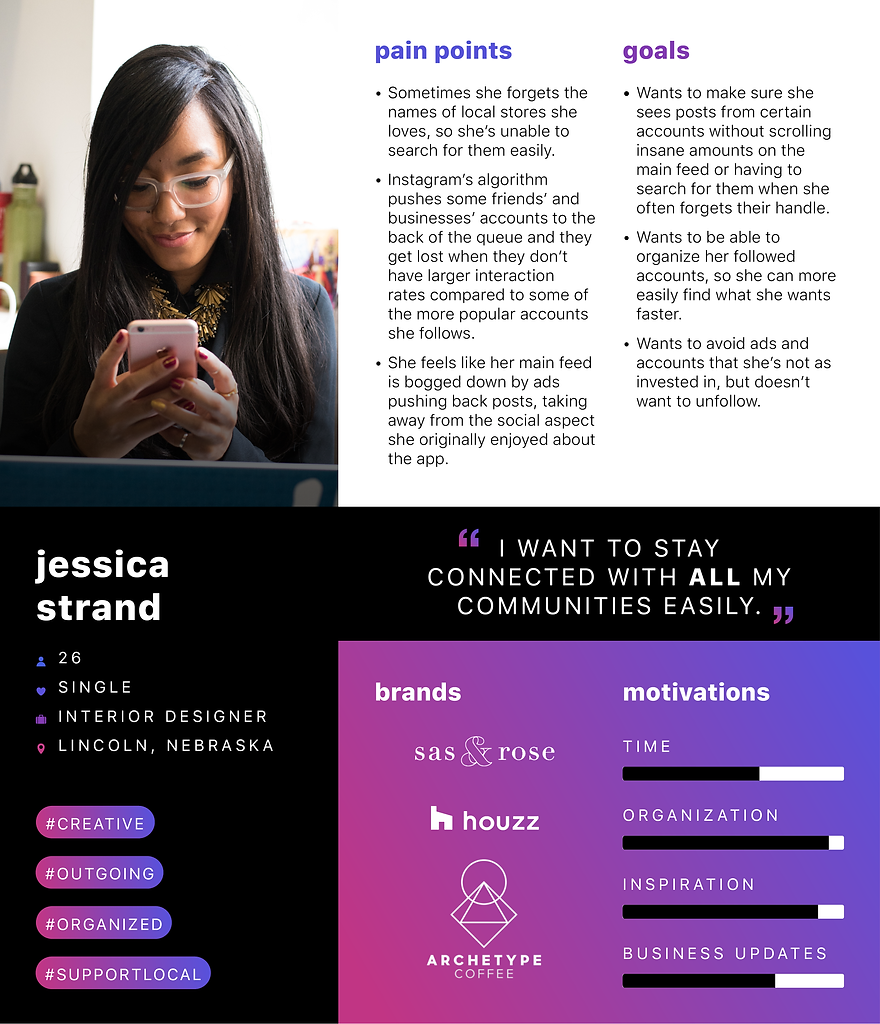
(Figure 2. Organized Instagram User - Jessica Strand Persona)
Information Architecture
FEATURE ROADMAP
After doing the research I had a better understanding of what types of functions and features a user would need to get a better sense of control and organization within Instagram. Here is a list of those features based on their level of importance:
Deliverables
-
Feature Roadmap
- Task Flows
PRIORITY LEVEL 1
Must-Have
-
Space/Icon for Account Collections on Bottom Navigation Menu
-
Account Collections Main Page
-
Create Collection Category Option
-
Account Collection Category Page
-
Horizontal Scroll Section With Profile Images for Accounts in the Collection
-
Save to Collection Option on Profiles
-
Save to Account Collection Modal
PRIORITY LEVEL 2
Nice to Have
-
Vertical Scroll Section With Recent Posts for Accounts in Collection
PRIORITY LEVEL 3
Surprising and Delightful
-
Search Within Saved Account Collections
PRIORITY LEVEL 4
Can Come Later
-
Filter Within Account Collections
TASK FLOWS
With these features in mind I created two main task flows that my persona would be following to utilize this new application feature. These task flows helped me understand how my upcoming wireframes would need to be laid out. Below are the two tasks:
Task 1
Jessica wants to go out for coffee with a friend who’s visiting her from out of town. Rather than going to Starbucks or another chain location she wants to take her friend to a cool, small, locally-owned shop she remembers following on Instagram a while back. However, she can’t remember the name of the shop, so she goes to her saved Account Collections to find it. (Figure 3) .

(Figure 3. Instagram Account Collections - Task Flow 1)
Task 2
Jessica is scrolling through her main feed when she sees a post from one of her favorite influencers that gives a shout-out to a natural body care account she’d never heard of. She checks out the account, quickly falls in love with it, and decides to follow it. She wants to make sure she can easily find this account, along with other related accounts, so she chooses to create a new Account Collection. (Figure 4) .

(Figure 4. Instagram Account Collections - Task Flow 2)
USER FLOW
I also created a user flow that mapped out all the ways a person could find and use this new application feature. To download and view this user flow click here.
Interaction Design
During my competitor analysis research I looked into design patterns among other social applications, as well as Instagram itself. I used this research to help inform the new Account Collection feature.
Deliverables
-
Design Patterns - Instagram
INSTAGRAM DESIGN PATTERNS
The following are design patterns from Instagram that I felt would work well applied to the new Account Collections feature:
Bottom Main Navigation
An icon that represents the Account Collections section needed to be added to this area, so it is always visible and accessible. (Figure 5)

(Figure 5. Design Patterns - Instagram Bottom Main Navigation)
Icons
An icon needed to be created for the Accounts Collection feature that is similar in style to the other icons used by Instagram. It needed to be different than the bookmark for saved posts though, so people wouldn’t get the two confused. It will be used in the bottom main navigation and the top right of all profile pages. (Figure 6)

(Figure 6. Design Patterns - Instagram Icons)
Stories
Similar to the stories feature on the home page there will be account profile images that are scrollable on a horizontal access at the top of each individual Account Collection Category page. Accounts with active stories will still have yellow/pink outlines, however, all accounts - including those without active stories - will still be visible at all times in this section. (Figure 7)

(Figure 7. Design Patterns - Instagram Stories)
Saved Posts Modal
A modal exactly like the Save Post modal will appear once the icon is clicked to allow users to save an account to a Collection. This modal will allow users to select from all previously created Collections or create a new one. (Figure 8)

(Figure 8. Design Patterns - Instagram Saved Posts Modal)
Saved Posts Categories
The hamburger menu on a profile page includes an option for Saved posts. When clicked on this shows all categories in a grid layout with a cover photo and title. This is exactly how the main Account Collections page will be laid out. It also gives you the option to create a new Collection category. This will also be an option on the new feature. (Figure 9)

(Figure 9. Design Patterns - Instagram Saved Posts Categories)
COMPETITOR DESIGN PATTERNS
The following are design patterns from competitors that related to and would potentially work well when creating the new Account Collections feature:
Twitter - Lists
Lists work in a very similar fashion to this new feature. Twitter allows users to create and organize accounts into customizable Lists where they can easily see the information from those accounts only.
Users can title and add a description to their Lists. They can access Lists from the hamburger menu navigation at the top left. The Lists are separate from the Saved posts, just like the Collections will be from Saved posts. A cover image for each Collection, similar to each List, would be a good option as well. (Figure 10)

(Figure 10. Design Patterns - Twitter Lists)
Houzz - Location Filters
For users who have large Collections a filter option may come in handy. This feature will work similar to Houzz’s filter function that allows users to filter by location (via current phone location or written location) and mile radius. (Figure 11)

(Figure 11. Design Patterns - Houzz Location Filters)
NEW ICON
The new Account Collections icon was created to fit in with the other current icons within Instagram's system. (Figure 12) It consists of squares that mimic the shape of the categories on the main Account Collections page. The layered squares represent the possibility of having lots of accounts within each Account Collection. The feel is similar to the multiple files within a folder.

Enabled

Selected
(Figure 12. Instagram Account Collections - New Icon)
WIREFRAMES
Finally I was ready to start laying out the new feature. Below are wireframes created using Instagram's pre-existing UI design and implementing the previously mentioned design patterns. (Figure 13) The Account Collections can be accessed from the bottom main navigation. To add an account to a user's Collections they can select the icon at the top of the account's profile, next to the account notifications icon. When clicked on this option takes a user through the same steps as the Bookmark Collections to add the account to that user's Account Collections. The main differences being that users will be allowed to add a description to their Collection and rather than using a photo from the account as a main graphic they will be able to choose from pre-made graphics. The Saved Account Collections looks exactly how the Saved Post Categories look under the Bookmark Collections and lastly, the individual Account Collection group will show how many accounts are within the Collection, those accounts' stories, and those accounts latest posts. Accounts with active stories will still have yellow/pink outlines, however, all accounts - including those without active stories - will still be visible at all times in this section.


(Figure 13. Instagram Account Collections - High-fidelity Wireframes)
Iteration and Implementation
Deliverables
-
Prototype
PROTOTYPE USER TESTING
Now that I had created the high-fidelity wireframes it was time to test them to make sure users would understand how to use them. I created a prototype that users would test by completing the two tasks mentioned in the earlier task flows, as well as rating usability and UI design. (Figure 14)
Task 1
Add an account to a new Account Collection
-
Was the icon for the Account Collections feature easy to distinguish?
Task 2
Find a profile from your Saved Account Collections
Final Opinion
Would you use this feature if it was available?

(Figure 14. Instagram Account Collections - Maze.co User Test)
Participants
The test was created on Maze.co and released to some of the previous interviewees and a few new participants.
My Goals
-
Participants would be able to easily distinguish the new icon.
-
The difference between bookmarked posts and Account Collections would be clear.
-
Participants would find it easy to access the new Account Collections page.
My Assumptions
-
Participants will recognize the new icon easily, because they haven’t seen it before.
-
Participants will recognize the consistency in Instagram’s current design patterns and will be able to navigate to and add to Account Collections easily.
-
This will be a feature people want.
USER TESTING RESULTS

TASK 1
Add an Account to a New Account Collection
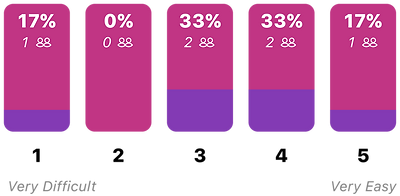
How easy was it to find where to add the profile to an Account Collection?
The average answer was 3.3.

TASK 2
Find a Profile From Your Saved Account Collections
How easy was it to access your Saved Account Collections?
The average answer was 4.5.

(Figure 15. Instagram Account Collections - User Test Results)
After viewing test results and speaking to participants the feedback I received was mostly positive. Participants felt the new icon was easy to understand and made sense. However, they also felt it was integrated so well that they did not recognize anything new at first. Because of this a couple people struggled a little more with the first task. After they did find the icon they felt like the design and function of the new feature was something they loved and really wanted to be utilized by Instagram.
Feedback
Would you use this feature if it was available?
-
"Yes, I am constantly seeing cute outfits from shops but forgetting the shops name when it comes time I want to shop. I could see this feature being super useful to help solve this problem!"
-
"Yes, sometimes I don’t want to get all the content from an account by following it, but want to remember the name to come back to it later. I also like how it would group similar accounts together."
-
"YES, definitely!!"
-
“YES! I can see using this feature many times. I do follow a lot of accounts and I can’t always remember the name of the account. If I don’t know the exact @ for the account it can be frustrating, because I’ll know generally what the profile was about, but can’t find it because maybe I forgot something small like the hyphen in the name. I wish it was available right now."
-
“Absolutely. All the time. The exact scenarios described in these two tasks happen to me frequently. IG needs some kind of accounts collection feature."
REVISIONS
Based off the results from the testing and direct feedback from participants it became evident that, because the icon was integrated well within Instagram’s design and because Instagram is a well-known and heavily used app, tool tips would be helpful to point out this new update and help people accomplish these tasks more effectively from the start. These tool tips would appear only on a user’s initial visit to their main feed and a profile page. (Figure 16)


(Figure 16. Instagram Account Collections - Tool Tips)
Next Steps
If Instagram were to go forward with this project the following steps should be taken next:
-
Now that tool tips have been added another round of user testing should be completed to see if this has the desired effect.
-
A search feature should be added down the road within the Saved Account Collections once the feature has gained popularity and users have established larger Collections.
-
A filter function that allows users to sort accounts by location of the business (or owner) - similar to the app Houzz - could be looked into and developed once the feature gains in popularity. After my research this feature did not seem as effective or as important as I originally thought it would be.
